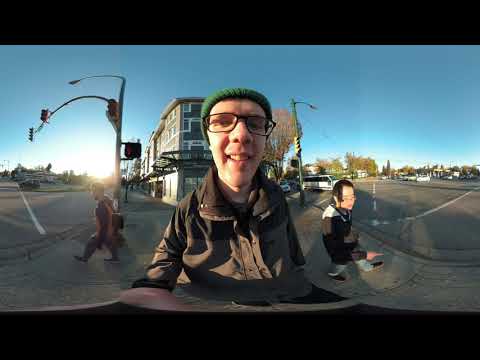
360 Vlog: Walking down Oak Street in Vancouver and exploring King Edward Mall
Using a stabilizer and 360 camera, I walk with a friend around Oak Street and King Edward Mall in Vancouver, Canada and point out some cool buildings and shops.

This is a 360 Video! Move your phone/tablet to explore or drag the screen on a web browser :)
This was shot on a YI 360 VR Camera, check them out at www.yitechnology.com/yi-360-vr-camera

Geoff from geoffmobile.com shares a walking video around the Oak and King Edward neighborhood of Vancouver, BC, Canada.

Please subscribe :) youtube.com/geoffmobile

Shown in the video:
– Starts at Pallet Coffee at West 22nd and King Edward
– We walk across the street to the west side of Oak Street and walk past the under construction Chateau Laurier
– We walk past the Royal Bank and Easter Seals house, and cross the street over to the Safeway at the King Edward Mall
– We have a look at the Orange Halloween Pumpkins outside the Safeway.
– We pause outside the Dollar Store which has signs about shoplifting
– I continue on and walk to the end of the mall, past the sushi restaurant, hair salon, all the way to the insurance agency at the end.

Geoff filmed this 360 video, a short video blog, in 360 degrees, using his YI 360 VR Camera in Vancouver, BC, Canada, using a Stayblcam stabilizer.

Here’s my friend Alvenh’s youtube channels, who joined me in the walking video:
www.youtube.com/channel/UCWhWAi6lMkYT6Qvui8SQt5w
www.youtube.com/user/LittleWolfBindery/

Filmed with YI 360 VR Camera in 4K resolution with in-camera stitching. I used the YI 360 camera handheld on the Stayblcam stabilizer and filmed the vlog.

Thanks for watching! Cheers, Geoff

Curious how I made this video? Look no further. I have explained how to do it in some easy tutorial videos. Here are the links to my 360 Video Editing tutorial video:

YI 360 VR Video editing tutorial using only FFMPEG, no Adobe Premiere required
www.youtube.com/watch?v=HSRuwmTS-T8

How to Edit 360 video in Adobe Premiere and upload to Youtube
www.youtube.com/edit?o=U&video_id=wO7FNAnqkH0

Notes:
Best viewed using headphones, and the Zeiss VR One Plus zeissvrone.tumblr.com/ or the Samsung Gear VR
Also compatible with Google Cardboard

Thanks for watching!
Cheers,
Geoff
geoffmobile.com

Technical notes:
This 4k resolution video was captured using the YI 360 VR Camera using on-camera stitching. It was edited in Adobe Premiere.

Filmed with the YI 360 VR Camera
www.yitechnology.com/yi-360-vr-camera

Looks good viewed with Zeiss VR One Plus:
zeissvrone.tumblr.com/

Also viewable in Virtual Reality with Google Cardboard
www.google.com/get/cardboard/

About 360 videos on Youtube:
support.google.com/youtube/answer/6178631?hl=en

More 360 videos from Youtube #360Video
www.youtube.com/channel/UCzuqhhs6NWbgTzMuM09WKDQ

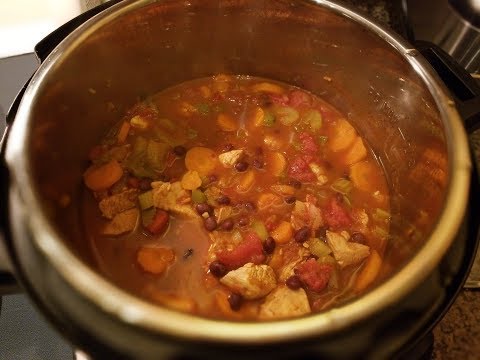
How to Fix Instant Pot Scorching / Burning rice on the bottom of the pot

In this video I share some thoughts and ideas about how to prevent the rice from burning or scorching on the bottom of the instant pot.

Also known as the Instant Pot Burn message or Overheat message.

My theory is that the instant pot needs to heat up all the ingredients in the pot to a high temperature before it can pressurize. If there are too many colder ingredients in the pot, it needs to get very hot on the bottom of the pot to transfer the heat into the rest of the pot. But if it takes too long to heat the pot through, the rice starts to absorb all the liquid in the pot and dries out, and then starts burning at the bottom of the pot.

Some possible solutions:
– Add a layer of water or clear broth at the bottom of the pot, followed by something fairly liquid but a bit fibrous such as salsa at the bottom of the pot, and then add the rice mixture above.
The salsa and extra water at the bottom will hopefully prevent the rice at the bottom from drying out.

– Don’t overload the pot with too many other ingredients if you are cooking rice in the pot.

Some other tips to try are here:
www.paintthekitchenred.com/instant-pot-burn-message/

My favorite chicken and rice recipe in the instant pot:
www.apinchofhealthy.com/instant-pot-chicken-rice/

A good Jambalaya recipe with rice in the instant pot:
www.paintthekitchenred.com/instant-pot-jambalaya/

This is a 360 Video! Move your phone/tablet to explore or drag the screen on a web browser :)
This was shot on a YI 360 VR Camera, check them out at www.yitechnology.com/yi-360-vr-camera

Quick Tech Tips: email buzzing and gradual alarm – 360 video

This is a 360 Video! Move your phone/tablet to explore or drag the screen on a web browser :)
This was shot on a YI 360 VR Camera, check them out at www.yitechnology.com/yi-360-vr-camera

Geoff from geoffmobile.com shares two quick tech tips, the first about disabling email buzzing on your cell phone, and the second about using a gradual alarm.

Please subscribe :) youtube.com/geoffmobile

Geoff filmed this 360 video, a short video blog, in 360 degrees, using his YI 360 VR Camera in Vancouver, BC, Canada.

Filmed with YI 360 VR Camera in 4K resolution with in-camera stitching. I used the YI 360 camera handheld and filmed the vlog.

Thanks for watching! Cheers, Geoff

Curious how I made this video? Look no further. I have explained how to do it in some easy tutorial videos. Here are the links to my 360 Video Editing tutorial video:

How to Edit 360 video in Adobe Premiere and upload to Youtube
www.youtube.com/edit?o=U&video_id=wO7FNAnqkH0

Notes:
Best viewed using headphones, and the Zeiss VR One Plus zeissvrone.tumblr.com/ or the Samsung Gear VR
Also compatible with Google Cardboard

Thanks for watching!
Cheers,
Geoff
geoffmobile.com

Technical notes:
This 4k resolution video was captured using the YI 360 VR Camera using on-camera stitching. It was edited in Adobe Premiere.

Filmed with the YI 360 VR Camera
www.yitechnology.com/yi-360-vr-camera

Looks good viewed with Zeiss VR One Plus:
zeissvrone.tumblr.com/

Also viewable in Virtual Reality with Google Cardboard
www.google.com/get/cardboard/

About 360 videos on Youtube:
support.google.com/youtube/answer/6178631?hl=en

More 360 videos from Youtube #360Video
www.youtube.com/channel/UCzuqhhs6NWbgTzMuM09WKDQ