360 Video: Gee Baby Ain’t I Good to You jazz standard played by Jazz Quartet in virtual reality

This is a 360 Video! Move your phone/tablet to explore or drag the screen on a web browser :)
This was shot on a Ricoh Theta S, check them out at theta360.com

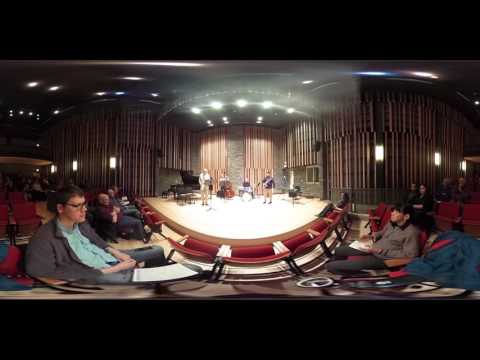
The “Tuesday Combo” from VSO School of Music performs the jazz standard Gee Baby Ain’t I Good To You (1929) song written by Andy Razaf and Don Redman.

The musicians:
Neil – tenor sax
Haig – guitar
Christian – bass
Dan – drums
Coached by Jodi Proznick

Please subscribe :) youtube.com/geoffmobile

Please check out the VSO School of Music here: vsoschoolofmusic.ca

Recorded in Vancouver BC Canada on December 15 2015.

Best viewed using Zeiss VR One zeissvrone.tumblr.com/
Also compatible with Google Cardboard

Audio recorded using Zoom H1.
Audio processed using Audacity.
360 Degree (Virtual Reality) Video recorded using Ricoh Theta S.
Titles added using Adobe Premiere Pro.
Audio and video recording by Geoff Peters.

Thanks for watching!!
Cheers,
Geoff
geoffmobile.com

Filmed with the Ricoh Theta S
theta360.com

Best viewed with Zeiss VR One:
zeissvrone.tumblr.com/

Also viewable in Virtual Reality with Google Cardboard
www.google.com/get/cardboard/

About 360 videos on Youtube:
support.google.com/youtube/answer/6178631?hl=en

More 360 videos from Youtube #360Video
www.youtube.com/channel/UCzuqhhs6NWbgTzMuM09WKDQ

360 Video: On Green Dolphin Street jazz standard played by Jazz Quartet in virtual reality

This is a 360 Video! Move your phone/tablet to explore or drag the screen on a web browser :)
This was shot on a Ricoh Theta S, check them out at theta360.com

The “Tuesday Combo” from VSO School of Music performs the jazz standard On Green Dolphin Street (1947) by Bronisław Kaper with lyrics by Ned Washington, made famous by Miles Davis in 1958.

The musicians:
Neil – tenor sax
Haig – guitar
Christian – bass
Dan – drums
Coached by Jodi Proznick

Please subscribe :) youtube.com/geoffmobile

Please check out the VSO School of Music here: vsoschoolofmusic.ca

Recorded in Vancouver BC Canada on December 15 2015.

Best viewed using Zeiss VR One zeissvrone.tumblr.com/
Also compatible with Google Cardboard

Audio recorded using Zoom H1.
Audio processed using Audacity.
360 Degree (Virtual Reality) Video recorded using Ricoh Theta S.
Titles added using Adobe Premiere Pro.
Audio and video recording by Geoff Peters.

Thanks for watching!!
Cheers,
Geoff
geoffmobile.com

Filmed with the Ricoh Theta S
theta360.com

Best viewed with Zeiss VR One:
zeissvrone.tumblr.com/

Also viewable in Virtual Reality with Google Cardboard
www.google.com/get/cardboard/

About 360 videos on Youtube:
support.google.com/youtube/answer/6178631?hl=en

More 360 videos from Youtube #360Video
www.youtube.com/channel/UCzuqhhs6NWbgTzMuM09WKDQ

360 Video: Roland Gaia SH-01 Synth Jam in 360 degree virtual reality – Feb 16 2016
This is a 360 Video! Move your phone/tablet to explore or drag the screen on a web browser :)
This was shot on a Ricoh Theta S, check them out at theta360.com

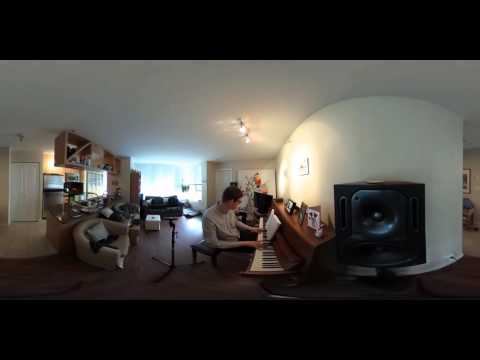
Geoff from geoffmobile.com does a 24 minute jam on his Roland Gaia SH-01 synthesizer, in 360 degree virtual reality.

Please subscribe :) youtube.com/geoffmobile

For more information on the Roland Gaia check out my blog post and playlist below:
geoffmobile.com/blog/basic-analog-synthesis-part-1-mov
www.youtube.com/playlist?list=PLpOuKedj0gNm_2W9teK0BxYG4cLKrZ5Qh

Best viewed using Zeiss VR One zeissvrone.tumblr.com/
Also compatible with Google Cardboard

Thanks for watching!
Cheers,
Geoff
geoffmobile.com

Technical notes:
Roland Gaia SH-01 synth recorded in stereo into a Zoom H1. Video captured using Ricoh Theta S 360 camera and synced up using Adobe Premiere Pro CS5.5.

Filmed with the Ricoh Theta S
theta360.com

Best viewed with Zeiss VR One:
zeissvrone.tumblr.com/

Also viewable in Virtual Reality with Google Cardboard
www.google.com/get/cardboard/

About 360 videos on Youtube:
support.google.com/youtube/answer/6178631?hl=en

More 360 videos from Youtube #360Video
www.youtube.com/channel/UCzuqhhs6NWbgTzMuM09WKDQ

360 Video: Driving in Vancouver on a rainy day in 360 degree virtual reality – Feb 14 2016

This is a 360 Video! Move your phone/tablet to explore or drag the screen on a web browser :)
This was shot on a Ricoh Theta S, check them out at theta360.com

I mounted the Ricoh Theta S 360 Degree camera on the dash of our 2010 Honda Fit, and drove across part of Vancouver on a rainy overcast day.

Please subscribe :) youtube.com/geoffmobile

Route: I started on Nelson/Cambie downtown and drove over the Cambie Bridge, turned left onto 7th and drove up to Main/Broadway, turned left onto Broadway and drove up to around Fraser Street. Route took me from from downtown to East Vancouver.

Recorded in Vancouver BC Canada on February 14th 2016.

Best viewed using Zeiss VR One zeissvrone.tumblr.com/
Also compatible with Google Cardboard

360 Degree (Virtual Reality) Video recorded using Ricoh Theta S.
Titles added using Adobe Premiere Pro.
Video recording by Geoff Peters.

Thanks for watching!!
Cheers,
Geoff
geoffmobile.com

Filmed with the Ricoh Theta S
theta360.com

Best viewed with Zeiss VR One:
zeissvrone.tumblr.com/

Also viewable in Virtual Reality with Google Cardboard
www.google.com/get/cardboard/

About 360 videos on Youtube:
support.google.com/youtube/answer/6178631?hl=en

More 360 videos from Youtube #360Video
www.youtube.com/channel/UCzuqhhs6NWbgTzMuM09WKDQ

Task Management in a Complex Work Environment – Toastmasters speech in 360 degree virtual reality

This is a 360 Video! Move your phone/tablet to explore or drag the screen on a web browser :)
This was shot on a Ricoh Theta S, check them out at theta360.com

Geoff from geoffmobile.com shares his tips for task management in a complex work environment, at Vancouver Toastmasters Club 59.

tmclub59.com
toastmasters.org

This 360 degree video is best viewed using a virtual reality headset, such as the amazing Zeiss VR One or Google Cardboard.
zeissvrone.tumblr.com/
www.google.com/get/cardboard/

Speech outline:
Every day we are faced with too much to do. There are urgent requests, long term goals, and lots of small tasks that must be done along the way. How can we decide what to work on, so we are doing the best thing at every moment? In my short presentation, I have three main points:
1. The power of asking the question: “What’s the next action?”
2. The importance of keeping things out of your head, using a trusted system that can capture the next actions.
3, How to avoid firefighting.

References and further reading: “Getting Things Done” a book by David Allen.

Thanks for watching!!
Cheers,
Geoff
geoffmobile.com