Welcome to my channel! youtube.com/geoffmobile
See you around :)
Music by Laundryman laundrymanmusic.com
Welcome to my channel! youtube.com/geoffmobile
See you around :)
Music by Laundryman laundrymanmusic.com
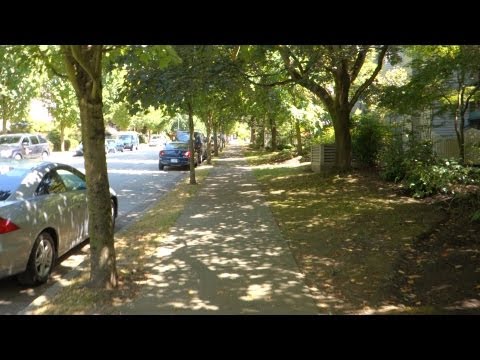
Geoff from geoffmobile.com walks around the Commercial Drive area of Vancouver BC Canada on August 13th 2013, a sunny summer day.
If you enjoyed this video, please subscribe :) youtube.com/geoffmobile
Sorry about the rocking motion for the 2nd half of the video.
Filmed using a Sony Cybershot RX100 and a Hague MMC Stabilizer
-Thanks for watching :)
Shout out to my friend from Berlin Germany, Woggyflush!!
youtube.com/woggyflush
Cheers,
Geoff
geoffmobile.com
Music:
Noble Race, Peace of Mind, Local Forecast
Kevin MacLeod (incompetech.com)
Licensed under Creative Commons: By Attribution 3.0
creativecommons.org/licenses/by/3.0/
Original end credits music by Geoff Peters, used with permission.
Technical notes:
Camera: Sony RX100 Cybershot (Highly recommended Camera!)
Stabilizer: Hague MMC
Edited with Adobe Premiere Pro CS5.5 on a Windows 7 Dell PC (Intel i7 and USB 3.0 for a faster workflow).
Geoff from geoffmobile.com walks around downtown Vancouver BC Canada on August 12th 2013, a sunny summer day.
If you enjoyed this video, please subscribe :) youtube.com/geoffmobile
Filmed using a Sony Cybershot RX100 and a Hague MMC Stabilizer
-Thanks for watching :)
Shout out to my friend from Berlin Germany, Woggyflush!!
youtube.com/woggyflush
Cheers,
Geoff
geoffmobile.com
Music:
Call to Adventure and Local Forecast
Kevin MacLeod (incompetech.com)
Licensed under Creative Commons: By Attribution 3.0
creativecommons.org/licenses/by/3.0/
Original end credits music by Geoff Peters, used with permission.
Technical notes:
Camera: Sony RX100 Cybershot (Highly recommended Camera!)
Edited with Adobe Premiere Pro CS5.5 on a Windows 7 Dell PC (Intel i7 and USB 3.0 for a faster workflow).
Old batteries sitting around? Want to test old batteries to see if they have any charge left? Geoff from geoffmobile.com shows how to accurately measure how much voltage a battery has remaining, using an inexpensive Multimeter
If you enjoyed this video, please subscribe :) youtube.com/geoffmobile
Save the planet! Please don’t throw away your old batteries. Instead, take them to your local store that offers battery recycling. In Vancouver Canada, the following locations offer battery recycling (thanks to Woggyflush):
The following Vancouver locations will take your used batteries for recycling:
• Vancouver Batteries: 2192 West Broadway
• London Drugs: Most Locations
• Leos Camera Supply: 1055 Granville Street
• Mountain Co-Op Equipment: 130 West Broadway
• WCS Recycling: 1493 Dominion Street
• Ikea: Coquitlam and Richmond
The multimeter shown in this video was purchased from The Source. It is a “NEXXTECH 19-RANGE ANALOG METER”. It does not require a battery inside to operate the multimeter. When buying a multimeter, make sure to buy one that does not require a battery to operate.
www.thesource.ca/estore/product.aspx?product=2211323&language=en-CA&utm_campaign=bazaarvoice&utm_medium=SearchVoice&utm_source=RatingsAndReviews&utm_content=Default
-Thanks for watching :)
Cheers,
Geoff
geoffmobile.com
Music for video: “Windy Mountain” by Geoff Peters, used with permission.
Original end credits music by Geoff Peters, used with permission.
Thanks to Tony for filming me realmeneatgreen.com
Technical notes:
Camera: Sony RX100 Cybershot (Highly recommended Camera!)
Audio recorded using a Zoom H1 and processed using Audacity.
Voice Mic: Sennheiser ME-2.
Edited with Adobe Premiere Pro CS5.5 on a Windows 7 Dell PC (Intel i7 and USB 3.0 for a faster workflow).
Audio synced with video using Pluraleyes from Singular Software.
Geoff from geoffmobile.com shows how to layer tones and create an “ocean waves” soundscape using his Roland Gaia SH-01 Synthesizer. He also shows some other sounds such as a video game sound at the end.
If you enjoyed this video, please subscribe :) youtube.com/geoffmobile
Geoff starts from the basic Wurlitzer patch he created. To download the Wurlitzer patch for your Gaia, please visit:
geoffmobile.com/blog/wurlitzer-sound-on-the-roland-gaia-how-to-make-a-classic-wurlitzer-keyboard-patch-by-geoffmobile-2
You can also get more sounds for the Gaia (many for free) from Roland’s new sound bank website:
axial.roland.com/category/gaia/
The Roland Gaia SH-01 is my favorite synth because it has huge polyphony, the ability to layer three different tones, and a huge array of neat effects and ways to modify and design the sound. It is a digital synth that simulates the sound of an analog synth. It has analog-synth-like controls that let you design the sound as you play. For more tutorial videos about the Roland Gaia, please check out my Best Roland Gaia SH-01 Synthesizer Tutorial Videos playlist at:
www.youtube.com/playlist?list=PLpOuKedj0gNm_2W9teK0BxYG4cLKrZ5Qh
-Thanks for watching :)
Cheers,
Geoff
geoffmobile.com
Original end credits music by Geoff Peters, used with permission.
Technical notes:
Camera: Sony RX100 Cybershot (Highly recommended Camera!)
Audio recorded using a Zoom H1 and Audacity.
Voice Mic: Sennheiser ME-2
Synth plugged directly into PC using USB, recording in 24 bit.
Edited with Adobe Premiere Pro CS5.5 on a Windows 7 Dell PC (Intel i7 and USB 3.0 for a faster workflow).
Audio synced with video using Pluraleyes from Singular Software.