Cora restaurant in Coquitlam BC Canada – great breakfast and lunch. petit-déjeuner au Vancouver

Geoff from geoffmobile.com visits Cora Restaurant in Coquitlam BC Canada (a suburb of Vancouver) and enjoys a great breakfast / lunch.

Cora – Coquitlam
3025 Lougheed Highway, Coquitlam, BC Canada
phone: 778-285-8577
Restaurant web site: www.chezcora.com

Note that the restaurant closes after lunch is done. The restaurant closes at 3pm on Monday to Thursday and 4pm on Friday to Sunday (they’re **only** a breakfast or lunch place!).

The restaurant also has many other locations across Canada including Alberta, Manitoba, Ontario, Quebec, and the Maritimes. For the Greater Vancouver area, Cora just opened a new location in Richmond BC Canada and a location in White Rock BC Canada as well.

Shown in video:
-Interior of restaurant
-Orange juice – great, better than the Keg restaurant’s orange juice :)
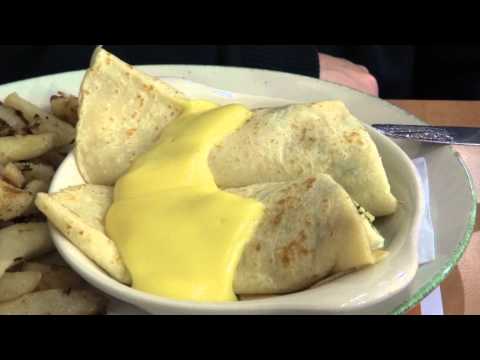
-Crepe Omelette with Ham and Cheese – called a “crepomelette” on the menu
-Fruit – it was really sweet and juicy. Their pineapple and kiwi rocks!
-Sourdough Toast (contrary to my comment in the video, it actually wasn’t dry: it had a nice buttery flavor, but I don’t like toast so much in general so that is why I made the comment).
-Crepe Omelette with Spinach (vegetarian)

Thanks for watching!

Cheers,
Geoff
geoffmobile.com

Technical notes:
Filmed on a Sony Cybershot DSC-HX9V with manual white balance set.
Edited with Adobe Premiere pro CS5.5 on a Windows 7 Dell PC (Intel i7 and USB 3.0 for a faster workflow).

For more videos about restaurants in Vancouver please visit my site geoffmobile.com or please subscribe to my channel :)
thanks!! :D

A Birds in the House Production
birdsinthehouse.com

Cora Breakfast & Lunch (Coquitlam) on Urbanspoon

Make your phone read a book aloud to you! Text to speech for ebooks on Android.

Geoff from geoffmobile.com shows his process for making his phone read books (ebooks and other text such as web pages, blogs, emails, etc.) aloud using Text to Speech (TTS) on Android.

Yes, you can make your phone read a book to you, using your headphones, or even in the car. And what’s more, you can create the book yourself using text from any web page.

Here’s the process, using an Android smart-phone and a PC or Mac desktop:

1. On your desktop, find the article you want the phone to read. Save it as a HTML file from the web site, or as a RTF file.

2. Install Calibre, a free ebook creator software. You can get it from: calibre-ebook.com/
It works on both Mac and PC.

3. Using Calibre, open the HTML or RTF file you saved, and select the “Convert” option to convert it to EPUB format.

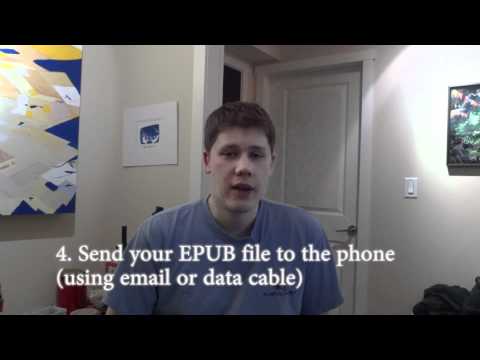
4. Put the EPUB file you created on your Android phone. You can do this by emailing it to yourself (and then use the Opera mobile browser on your phone to download from your email to your phone), or you can connect the phone to your computer using the USB cable, and then transfer the EPUB file by copying it to the phone).

5. Install the free Android application called “FBReader” as well as the “FBReader TTS Plugin”. You will need both of these applications for it to work. You can get them from the Android Market (Google Play store) or from their website: www.fbreader.org/

6. Using FBReader on your phone, open your EPUB file. View the page of the book you want to start reading, and then go to the menu and choose “Speak”.

7. That’s it! Also note that if you go into the Accessibility settings on your phone, you can change the voice and language to other options such as British English, French, German, etc.

Hope you enjoyed this tutorial. Have fun and please let me know your comments!

p.s. the article that my phone was reading is: “Lockdown – The coming war on general-purpose computing” by Cory Doctorow, posted January 2012. A great article, I highly recommend it. Article link: boingboing.net/2012/01/10/lockdown.html

Cheers, :)
Geoff
geoffmobile.com

Technical notes:

Camera : Sony Cybershot DSC-HX9V (manual white balance)
Audio: Zoom H1 connected to lapel mic under my shirt
Audio processed with Audacity (I used the SC4 compressor and Amplify effects).
Video edited with Adobe Premiere Pro CS5.5 on a Windows 7 Dell PC (Intel i7 and USB 3.0 for a faster workflow). Audio synced with video using Pluraleyes from Singular Software.

A Birds in the House Production
birdsinthehouse.com

Mehfil Indian Buffet restaurant Surrey BC Canada – April 2012

Mehfil India Restaurant
9570 Scott Road (120 Street)
Surrey, BC, Canada (a suburb of Vancouver)
Restaurant’s web site: mehfilindia.com

Geoff from geoffmobile.com shows the neighborhood where he grew up (North Delta / Surrey) as they drive down Scott Road (120th Street) past the various stores. He then visits Mehfil India Buffet restaurant (a great Indian buffet in Surrey for amazing all-you-can-eat food with delicious flavors!!).

Shown in video:

-street scenes from Delta and Surrey BC Canada (Including Future Shop, IHOP, London Drugs, and Cineplex Odeon. We also go past the site of a bad fire where a building was destroyed).

-the interior of Mehfil India restaurant in Surrey.
-the hot buffet table (the cold items are at a different table).
-Geoff’s first plate of selections from the buffet – yum!!
-Some other buffet selections ( we were very hungry, and the food at Mehfil was delicious and very satisfying!).

Price is reasonable as well. Mehfil buffet is Great for a visit after working out, running, or cycling. It’s one of our favorite places for filling and delicious food in North Delta / Surrey area.

Thanks for watching!

For more videos from the Vancouver area please subscribe to my channel, and also check out geoffmobile.com

Cheers,
Geoff
geoffmobile.com

Technical notes:
Filmed on a Sony Cybershot DSC-HX9V and edited with Adobe Premiere Pro CS5.5 on a Windows 7 Dell PC (Intel i7 and USB 3.0 for a faster workflow).

Mehfil on Urbanspoon