Review of Plex Media Server – by Geoffmobile

Geoff from geoffmobile.com does a short review of Plex Media Server, a great way to share your home music and video collection with your mobile device and work computer.

Please subscribe :) youtube.com/geoffmobile

You can find out more information about Plex at plex.tv

I really like this software. It lets me access my music/videos collection (that is stored on my desktop at home) anywhere, such as at work or on my mobile phone. I only paid a few dollars for their Android app, the other parts are free. plex.tv/

We use Plex at home with our Roku 3 smart TV box: roku.com

Thanks for watching!
Cheers,
Geoff
geoffmobile.com

Reduce clutter by scanning old documents – quick tech tip for Android

Geoff from geoffmobile.com gives a 1 minute tech tip on how to reduce clutter by scanning your old documents and business cards.

Please subscribe :) youtube.com/geoffmobile

Here is Geoff’s blog post on “How to scan a document using your Android Phone and the Google Drive app”:
geoff604.tumblr.com/post/87857365603/cool-feature-scan-to-pdf-from-your-android-phone

Here is a link to download the Google Drive app (which has the scanning feature):
play.google.com/store/apps/details?id=com.google.android.apps.docs&hl=en

Here is the business card scanning app I am using on Android (it works ok and is free):
“CardToContact Card Reader”
play.google.com/store/apps/details?id=com.akhmallc.andrd.bizcard&hl=en

Hope you enjoy :)
Thanks,
Geoff
geoffmobile.com

Filmed on a Google Nexus 5 cellphone and uploaded from the phone :)

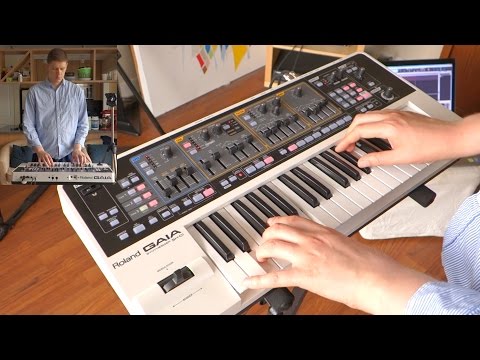
Birthday Roland Gaia SH-01 synth jam August 12 2014 by geoffmobile

Geoff from geoffmobile.com does a 38 minute jam/practice on his Roland Gaia SH-01 synthesizer.

Please subscribe :) youtube.com/geoffmobile

This jam is dedicated to my brother Byron!

*** For a Free Mp3 download of this jam, please visit:
drive.google.com/folderview?id=0B8NHtxiv_ETuTHhiM3BabkE0c28&usp=sharing

Love,
Geoff

I love the Roland Gaia synth, it’s so much fun to play with. Very versatile and creative instrument with endless possibilities. Hope you enjoy this synth!

Technical notes:

Filmed using Sony RX100 and Sony RX100 Mk2 cameras. Audio recorded using Sonar X1 LE on a Roland Octa capture in 24bit 48khz and edited using Adobe Premiere Pro CS5.5 on a Windows 7 Dell PC (Intel i7 and USB 3.0 for a faster workflow).

How to use Wifi Analyzer app on Android Tutorial demo by geoffmobile

Geoff from geoffmobile.com shows off a really cool and useful Android app, called “Wifi Analyzer by Farproc” which allows you to see the channels and strengths of the competing wifi routers in your home and nearby.

Please subscribe :) youtube.com/geoffmobile

Link to the app (Wifi Analyzer by Farproc):
play.google.com/store/apps/details?id=com.farproc.wifi.analyzer&hl=en

Hope you found this demo helpful. :)

Here is some more info on how this app can be used:
When a wifi router communicates, it uses a channel for its signal. However, there are only around 10 channels available, and if there are too many routers on the same channel the data transfer speed may be slower or you may even lose your connection.

By identifying the strengths of the different wifi signals that are competing with your own wifi router, as well as the channels that they are set to, you can identify possible issues with your wifi router and also may be able to manually set your router’s channel to a different channel to avoid competing with nearby routers.

To change your router’s channel, please see the user manual for your router. It usually involves logging into the router’s configuration screen using a web browser set to a certain IP address, and username and password for your router.

Any questions please let me know and I’ll try to help :)
Cheers,
Geoff
geoffmobile.com